API Gateway (Envoy Gateway)
Envoy Gateway is a Kubernetes gateway controller built on top of Envoy Proxy and the Kubernetes Gateway API. It provides a modern way to expose HTTP and L4/L7 services from the cluster without depending on controller-specific Ingress annotations.
In the Pi Cluster, Envoy Gateway is intended to be the shared north-south entrypoint for services exposed through Kubernetes Gateway API resources. HTTP services are currently exposed through resources such as Gateway and HTTPRoute, and non-HTTP protocols are also supported, for example Kafka exposure through TLSRoute. The same model can be extended in the future to additional protocol-specific routes such as GRPCRoute or UDPRoute. Envoy Gateway also provides policy resources for TLS, client and backend traffic handling, and OIDC authentication.
Ingress API vs Gateway API
Kubernetes Ingress was the first standard API for HTTP ingress traffic, but it has some limitations:
Ingressmixes infrastructure concerns and application routing in the same resource.- Advanced features usually depend on controller-specific annotations.
- Cross-namespace sharing and policy attachment are limited.
- The API only models HTTP ingress use cases, while modern platforms often need more protocol-aware routing.
Gateway API is the evolution of Ingress and addresses those limitations with a role-oriented model:
GatewayClass: defines the gateway implementation handled by a controller.Gateway: defines a concrete network entrypoint, listeners, ports, TLS certificates, and attachment policies.HTTPRoute,GRPCRoute,TLSRoute,TCPRoute, and others: define protocol-specific routing rules.
Main benefits over Ingress are:
- Better separation between cluster operator concerns and application team concerns.
- Portable and expressive routing without relying on opaque annotations.
- Shared gateways that can be consumed from multiple namespaces.
- Policy attachment model that makes authentication, traffic tuning, and security easier to manage.
In other words, Ingress is a simple HTTP entrypoint API, while Gateway API is a richer service networking API. Envoy Gateway is one of the implementations of that API.
Envoy Gateway Architecture
Envoy Gateway has two main planes:
- The control plane, implemented by the Envoy Gateway controller, watches Gateway API resources and translates them into Envoy configuration.
- The data plane, implemented by one or more managed Envoy proxy deployments, receives the actual client traffic.
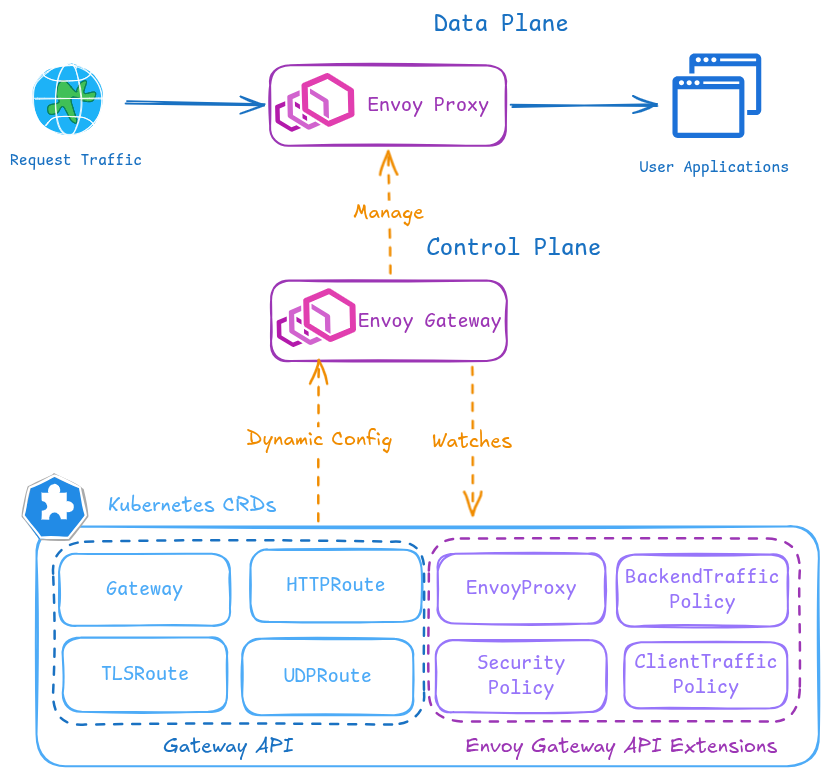
Envoy-Gateway architecture diagram. The data plane consists of Envoy proxy instances managed by the control plane. The control plane watches Gateway API resources and translates them into Envoy configuration for the data plane. It manages Envoy proxy deployments and services, and it also provides a policy model for authentication, traffic control, and security.
Envoy Gateway extends the Kubernetes Gateway API with additional policy resources such as ClientTrafficPolicy, BackendTrafficPolicy, and SecurityPolicy that can be attached to Gateway and route resources for advanced traffic control and authentication.
In this repository, the architecture is composed of the following resources:
HelmReleaseinstalls Envoy Gateway in namespaceenvoy-gateway-system.GatewayClassnamedenvoybinds the Kubernetes Gateway API resources to the Envoy Gateway controller.EnvoyProxynamedenvoydefines provider-specific settings for managed Envoy deployments, such as replicas, service type, logging, and metrics.Gatewaynamedpublic-gatewaydefines the cluster entrypoint with one HTTP listener on port80and one HTTPS listener on port443.HTTPRouteresources, created either manually or by Helm charts, attach application routes to that shared gateway.- Envoy Gateway specific policies, such as
ClientTrafficPolicy,BackendTrafficPolicy, andSecurityPolicy, extend Gateway API with traffic and auth controls.
Current implementation details used in Pi Cluster:
- The shared
Gatewayexposes a static load balancer IP through Cilium LB-IPAM annotationio.cilium/lb-ipam-ips: ${HTTP_GATEWAY_LOAD_BALANCER_IP}. - TLS is terminated at the gateway using a wildcard certificate stored in secret
pi-cluster-tls. - The HTTP listener only accepts same-namespace routes so it can be reserved for a global HTTP to HTTPS redirect route.
- The HTTPS listener accepts routes from all namespaces, allowing application teams to attach
HTTPRouteresources independently.
Envoy Gateway Installation
Installation is done from the official OCI Helm chart published by the Envoy project.
Note:
In this repository Envoy Gateway is deployed through Flux CD using:
kubernetes/clusters/prod/infra/envoy-gateway-app.yamlkubernetes/platform/envoy-gateway/app/overlays/prodkubernetes/platform/envoy-gateway/config/overlays/prod
The steps below describe the equivalent manual Helm installation flow.
Prerequisites
- A Kubernetes cluster with a load balancer implementation. In Pi Cluster, Cilium LB-IPAM is used.
- Gateway API CRDs. The Envoy Gateway Helm chart installs them by default.
- Cert-manager if TLS certificates for the
Gatewayare going to be managed automatically. - External-DNS if hostnames declared in
HTTPRouteresources need to be published automatically. See DNS Homelab Architecture.
Install Envoy Gateway from Helm
-
Step 1: Create a values file
envoy-gateway-values.yamlconfig: envoyGateway: provider: type: Kubernetes kubernetes: deploy: type: GatewayNamespaceGatewayNamespacedeploy mode makes Envoy Gateway place the managed Envoy data plane in the same namespace as theGatewayresource instead of always using the controller namespace. -
Step 2: Install the Helm chart
helm install envoy-gateway oci://docker.io/envoyproxy/gateway-helm \ --version v1.7.1 \ -n envoy-gateway-system \ --create-namespace \ -f envoy-gateway-values.yaml -
Step 3: Wait for the control plane deployment to become available
kubectl wait --timeout=5m -n envoy-gateway-system deployment/envoy-gateway --for=condition=Available -
Step 4: Verify installation
kubectl get pods -n envoy-gateway-system
kubectl get gatewayclass
Base Configuration
After the Helm release is installed, the shared gateway resources need to be created.
GatewayClass
Create the GatewayClass handled by Envoy Gateway:
apiVersion: gateway.networking.k8s.io/v1
kind: GatewayClass
metadata:
  name: envoy
spec:
  controllerName: gateway.envoyproxy.io/gatewayclass-controller
  parametersRef:
    group: gateway.envoyproxy.io
    kind: EnvoyProxy
    name: envoy
    namespace: envoy-gateway-system
EnvoyProxy
In Pi Cluster, EnvoyProxy is used to define global data plane settings:
apiVersion: gateway.envoyproxy.io/v1alpha1
kind: EnvoyProxy
metadata:
  name: envoy
spec:
  logging:
    level:
      default: info
  provider:
    type: Kubernetes
    kubernetes:
      envoyDeployment:
        replicas: 2
        container:
          imageRepository: mirror.gcr.io/envoyproxy/envoy
          resources:
            requests:
              cpu: 100m
            limits:
              memory: 1Gi
      envoyService:
        type: LoadBalancer
        externalTrafficPolicy: Cluster
  shutdown:
    drainTimeout: 180s
  telemetry:
    metrics:
      prometheus:
        compression:
          type: Gzip
This configuration provides:
- Two Envoy data plane replicas.
- A
LoadBalancerservice for external access. - Prometheus-compatible metrics exposure.
- Default control-plane logging at
infolevel.
Gateway and TLS termination
The shared Gateway defines two listeners:
apiVersion: gateway.networking.k8s.io/v1
kind: Gateway
metadata:
  name: public-gateway
spec:
  gatewayClassName: envoy
  infrastructure:
    annotations:
      io.cilium/lb-ipam-ips: ${HTTP_GATEWAY_LOAD_BALANCER_IP}
  listeners:
    - name: http
      protocol: HTTP
      port: 80
      allowedRoutes:
        namespaces:
          from: Same
    - name: https
      protocol: HTTPS
      port: 443
      allowedRoutes:
        namespaces:
          from: All
      tls:
        certificateRefs:
          - kind: Secret
            name: pi-cluster-tls
TLS is terminated at the gateway. In Pi Cluster the certificate is generated by cert-manager using a wildcard Certificate:
apiVersion: cert-manager.io/v1
kind: Certificate
metadata:
  name: pi-cluster-tls
spec:
  dnsNames:
    - ${CLUSTER_DOMAIN}
    - "*.${CLUSTER_DOMAIN}"
  issuerRef:
    kind: ClusterIssuer
    name: letsencrypt-issuer
  privateKey:
    algorithm: ECDSA
    size: 256
    rotationPolicy: Always
  secretName: pi-cluster-tls
To enable Gateway-based certificate management, cert-manager is configured with:
config:
  enableGatewayAPI: true
In this repository that value is added through the cert-manager Helm values overlay:
# cert-manager helm values (gateway-api)
# Enabling Gateway API support in cert-manager, which allows cert-manager to manage certificates for Gateways defined using the Gateway API.
config:
  enableGatewayAPI: true
When installing cert-manager manually with Helm, the equivalent values.yaml can be:
crds:
  enabled: true
config:
  enableGatewayAPI: true
And installed with:
helm install cert-manager jetstack/cert-manager \
  --namespace cert-manager \
  --create-namespace \
  -f cert-manager-values.yaml
Without config.enableGatewayAPI: true, cert-manager will not watch Gateway API resources and Gateway-based certificate workflows will not be available.
Global HTTP to HTTPS redirect
In this repository, the HTTP listener is reserved for a single redirect route:
apiVersion: gateway.networking.k8s.io/v1
kind: HTTPRoute
metadata:
  name: https-redirect
  namespace: networking
  annotations:
    external-dns.alpha.kubernetes.io/controller: none
spec:
  parentRefs:
    - name: public-gateway
      namespace: envoy-gateway-system
      sectionName: http
  rules:
    - filters:
        - type: RequestRedirect
          requestRedirect:
            scheme: https
            statusCode: 301
Configuring Applications with HTTPRoute
Applications can expose themselves through Envoy Gateway by attaching HTTPRoute resources to the shared gateway.
Manual HTTPRoute manifests
Some services define explicit HTTPRoute resources. For example, Kiali:
apiVersion: gateway.networking.k8s.io/v1
kind: HTTPRoute
metadata:
  name: kiali-console
spec:
  hostnames:
    - kiali.${CLUSTER_DOMAIN}
  parentRefs:
    - group: gateway.networking.k8s.io
      kind: Gateway
      name: public-gateway
      namespace: envoy-gateway-system
  rules:
    - matches:
        - path:
            type: PathPrefix
            value: /
      backendRefs:
        - name: kiali
          port: 20001
Another example is MinIO, where two different hostnames map to two different backends:
apiVersion: gateway.networking.k8s.io/v1
kind: HTTPRoute
metadata:
  name: minio
spec:
  hostnames:
    - s3.${CLUSTER_DOMAIN}
  parentRefs:
    - name: public-gateway
      namespace: envoy-gateway-system
  rules:
    - matches:
        - path:
            type: PathPrefix
            value: /
      backendRefs:
        - name: minio
          port: 9000
---
apiVersion: gateway.networking.k8s.io/v1
kind: HTTPRoute
metadata:
  name: minio-console
spec:
  hostnames:
    - minio.${CLUSTER_DOMAIN}
  parentRefs:
    - name: public-gateway
      namespace: envoy-gateway-system
  rules:
    - matches:
        - path:
            type: PathPrefix
            value: /
      backendRefs:
        - name: minio-console
          port: 9001
HTTPRoute created from Helm values
Several Helm charts in the repository generate Gateway API resources directly from values. This is the pattern used, for example, for Grafana:
grafana.ini:
  server:
    domain: grafana.${CLUSTER_DOMAIN}
    root_url: "https://%(domain)s/"

route:
  main:
    enabled: true
    apiVersion: gateway.networking.k8s.io/v1
    kind: HTTPRoute
    hostnames:
      - grafana.${CLUSTER_DOMAIN}
    parentRefs:
      - name: public-gateway
        namespace: envoy-gateway-system
    matches:
      - path:
          type: PathPrefix
          value: /
The same idea is used by other applications such as Longhorn, Prometheus, and Alertmanager.
OIDC Integration with Envoy Gateway
One of the most useful features in the current implementation is the use of Envoy Gateway native SecurityPolicy resources to protect HTTPRoute resources with OpenID Connect.
This is different from the older Ingress NGINX + oauth2-proxy pattern where applications were protected using auth-url and auth-signin annotations. With Envoy Gateway, authentication is attached directly to the route as policy.
The identity provider used in Pi Cluster is Keycloak:
- Issuer URL:
https://iam.${CLUSTER_DOMAIN}/realms/picluster - One OIDC client per protected application or dashboard.
Configure Keycloak client
Each application protected by Envoy Gateway SecurityPolicy needs its own OIDC client in Keycloak.
Note:
The client can be created manually in the Keycloak UI, but in Pi Cluster it can also be provisioned automatically using Flux Tofu Controller and the Keycloak OpenTofu/Terraform module described in SSO with KeyCloak and Oauth2-Proxy.
That automated path is the preferred option when Keycloak clients should be managed declaratively in Git.
Procedure in Keycloak documentation: Keycloak: Creating an OpenID Connect client
-
Step 1: Create a new OIDC client in
piclusterrealm by navigating to:Clients -> Create clientProvide the following basic configuration:
- Client Type:
OpenID Connect - Client ID: application specific value, for example
longhorn,kafdrop,hubble,prometheusoralertmanager
Click
Next. - Client Type:
-
Step 2: Configure the client capabilities
Provide the following capability configuration:
- Client authentication:
On - Standard flow:
On - Direct access grants:
Off
Click
Next. - Client authentication:
-
Step 3: Configure login and redirect URLs
Provide the application callback URL that Envoy Gateway will use after successful authentication.
Note:
The redirect URL or callback URI does not need to exist as a real endpoint in the target application. It is still required in the Keycloak client configuration because Envoy Gateway uses that callback path to complete the OIDC authorization code flow for the protected
HTTPRoute.For example, for Longhorn:
- Valid redirect URIs:
https://longhorn.${CLUSTER_DOMAIN}/oauth2/callback - Root URL:
https://longhorn.${CLUSTER_DOMAIN} - Home URL:
https://longhorn.${CLUSTER_DOMAIN} - Web Origins:
https://longhorn.${CLUSTER_DOMAIN}
Equivalent callback URLs for other protected applications are:
- Hubble:
https://hubble.${CLUSTER_DOMAIN}/oauth2/callback - Kafdrop:
https://kafdrop.${CLUSTER_DOMAIN}/oauth2/callback - Prometheus:
https://prometheus.${CLUSTER_DOMAIN}/oauth2/callback - Alertmanager:
https://alertmanager.${CLUSTER_DOMAIN}/oauth2/callback
Save the configuration.
- Valid redirect URIs:
-
Step 4: Locate client credentials
Under the
Credentialstab, copy the generated client secret. -
Step 5: Store the client credentials as secret material
In Pi Cluster, client credentials are not stored directly in Git. They are stored in Vault and synchronized into Kubernetes through
ExternalSecretresources.The values needed for each protected application are:
client-idclient-secret
Those values are later referenced by Envoy Gateway
SecurityPolicythroughclientIDRefandclientSecret.
Note:
Unlike the older oauth2-proxy integration, Envoy Gateway native OIDC protection does not require a separate proxy deployment per protected application. Authentication is enforced directly by the gateway through SecurityPolicy attached to the corresponding HTTPRoute.
SecurityPolicy example
Longhorn dashboard is protected with the following policy:
apiVersion: gateway.envoyproxy.io/v1alpha1
kind: SecurityPolicy
metadata:
  name: longhorn-dashboard
spec:
  targetRefs:
    - group: gateway.networking.k8s.io
      kind: HTTPRoute
      name: longhorn-httproute
  oidc:
    provider:
      issuer: "https://iam.${CLUSTER_DOMAIN}/realms/picluster"
    clientIDRef:
      name: oauth2-externalsecret
    clientSecret:
      name: oauth2-externalsecret
    redirectURL: "https://longhorn.${CLUSTER_DOMAIN}/oauth2/callback"
    logoutPath: "/longhorn/logout"
This same pattern is currently used for other dashboards such as:
- Hubble
- Longhorn
- Kafdrop
- Prometheus
- Alertmanager
Supplying client credentials
Client credentials are stored as Kubernetes secrets generated from External Secrets. For example:
apiVersion: external-secrets.io/v1
kind: ExternalSecret
metadata:
  name: oauth2-externalsecret
spec:
  secretStoreRef:
    name: vault-backend
    kind: ClusterSecretStore
  target:
    name: oauth2-externalsecret
  data:
    - secretKey: client-id
      remoteRef:
        key: longhorn/oauth2
        property: client-id
    - secretKey: client-secret
      remoteRef:
        key: longhorn/oauth2
        property: client-secret
That approach keeps OIDC credentials out of Git and aligns with the rest of the secret management model used in the cluster.
OIDC flow summary
The request flow is the following:
- The client requests an application URL attached to an
HTTPRoute. - Envoy Gateway evaluates the
SecurityPolicyattached to that route. - If the user is not authenticated, Envoy redirects the user to Keycloak.
- After a successful login, Keycloak redirects the user back to the configured callback URL.
- Envoy validates the OIDC response and forwards the request to the backend service.
Observability
Envoy Gateway exposes metrics from both the control plane and the managed Envoy proxies. Metrics are exposed in Prometheus format and can be scraped directly by Prometheus or exported to an OpenTelemetry Collector using the OpenTelemetry metrics sink. Envoy Gateway also provides operational logs from the control plane and supports integration with OpenTelemetry for proxy traces, access logs, and metrics.
Prometheus Integration
ServiceMonitoring, and PodMonitor Prometheus Operator’s CRD, resource can be automatically created so Kube-Prometheus-Stack is able to automatically start collecting metrics from Envoy Gateway control plane and data plane.
- A
ServiceMonitorfor the Envoy Gateway control plane scraping/metricson portmetrics. - A
PodMonitorfor the managed Envoy proxy pods scraping/stats/prometheuson portmetrics.
Examples:
apiVersion: monitoring.coreos.com/v1
kind: ServiceMonitor
metadata:
  name: envoy-gateway
spec:
  endpoints:
    - port: metrics
      path: /metrics
      honorLabels: true
apiVersion: monitoring.coreos.com/v1
kind: PodMonitor
metadata:
  name: envoy-proxy
spec:
  podMetricsEndpoints:
    - port: metrics
      path: /stats/prometheus
      honorLabels: true
Additionally, the EnvoyProxy resource enables Prometheus metrics compression:
telemetry:
  metrics:
    prometheus:
      compression:
        type: Gzip
Logs
The control plane log level is configured through EnvoyProxy:
logging:
  level:
    default: info
That provides operational logs for the Envoy Gateway managed resources.
OpenTelemetry integration
Envoy Gateway also supports integration with OpenTelemetry for proxy traces, access logs, and metrics. In Pi Cluster, that integration can rely on the existing OpenTelemetry stack already deployed in the repository.
See OpenTelemetry integration details in the official documentation: Envoy Gateway: Observability.
To enable that integration, Envoy Gateway needs to be configured to export telemetry data to an OpenTelemetry Collector. See Open-Telemetry Collector for details on the collector deployed in the cluster.
The following telemetry data can be exported to OpenTelemetry:
- Traces from the Envoy proxy data plane.
- Access logs from the Envoy proxy data plane.
- Metrics from both the control plane and the data plane.
To enable OpenTelemetry export, the EnvoyProxy and the control plane configuration need to be updated to include OpenTelemetry sinks. This can be done when installing the Helm chart or by applying updated EnvoyProxy and Gateway resources after installation.
To enable OpenTelemetry export for control plane metrics, add the following helm values when installing the chart:
config:
  envoyGateway:
    telemetry:
      metrics:
        sinks:
          - type: OpenTelemetry
            openTelemetry:
              host: otel-collector.otel.svc.cluster.local
              port: 4317
              protocol: grpc
              exportInterval: 60s
              exportTimeout: 30s
To enable OpenTelemetry export (metrics, traces, access logs) for data-plane, add the following to EnvoyProxy resource:
telemetry:
  accessLog:
    settings:
      - sinks:
          - type: OpenTelemetry
            openTelemetry:
              backendRefs:
                - name: otel-collector
                  namespace: otel
                  port: 4317
        format:
          type: Text
          text: |
            [%START_TIME%] "%REQ(:METHOD)% %REQ(X-ENVOY-ORIGINAL-PATH?:PATH)% %PROTOCOL%" %RESPONSE_CODE% %RESPONSE_FLAGS% %BYTES_RECEIVED% %BYTES_SENT% %DURATION% "%REQ(X-FORWARDED-FOR)%" "%REQ(USER-AGENT)%" "%REQ(X-REQUEST-ID)%" "%REQ(:AUTHORITY)%" "%UPSTREAM_HOST%"
  tracing:
    samplingRate: 100
    provider:
      type: OpenTelemetry
      serviceName: envoy-gateway-proxy
      backendRefs:
        - name: otel-collector
          namespace: otel
          port: 4317
  metrics:
    prometheus:
      compression:
        type: Gzip
    sinks:
      - type: OpenTelemetry
        openTelemetry:
          backendRefs:
            - name: otel-collector
              namespace: otel
              port: 4317
With that configuration, the Envoy proxy will export access logs, traces, and metrics to the OpenTelemetry Collector deployed in the cluster. The collector can then be configured to forward that telemetry data to a backend such as Prometheus, Tempo, or Elasticsearch. See details about Observability architecture in the Pi Cluster in Observability Architecture.
Grafana dashboards
Envoy Gateway Grafana dashboards can be found in the upstream Envoy Gateway project and in the Grafana community catalog:
- Upstream dashboards: Envoy Gateway GitHub repository:
charts/gateway-addons-helm/dashboards - Community dashboards: Grafana dashboards for Envoy
Dashboards can be automatically added using Grafana’s dashboard providers configuration. See further details in “PiCluster - Observability Visualization (Grafana): Automating installation of community dashboards”.
Add following configuration to Grafana’s helm chart values file:
dashboardProviders:
  dashboardproviders.yaml:
    apiVersion: 1
    providers:
      - name: envoy-gateway
        orgId: 1
        folder: Envoy-Gateway
        type: file
        disableDeletion: false
        editable: true
        options:
          path: /var/lib/grafana/dashboards/envoy-gateway-folder

dashboards:
  envoy-gateway:
    envoy-proxy:
      url: https://raw.githubusercontent.com/envoyproxy/gateway/refs/heads/main/charts/gateway-addons-helm/dashboards/envoy-proxy-global.json
      datasource:
        - { name: DS_PROMETHEUS, value: Prometheus }
    envoy-gateway:
      url: https://raw.githubusercontent.com/envoyproxy/gateway/refs/heads/main/charts/gateway-addons-helm/dashboards/envoy-gateway-global.json
      datasource:
        - { name: DS_PROMETHEUS, value: Prometheus }
    envoy-overview:
      gnetId: 24459
      revision: 3
      datasource:
        - { name: DS_PROMETHEUS, value: Prometheus }
    envoy-upstream:
      gnetId: 24457
      revision: 3
      datasource:
        - { name: DS_PROMETHEUS, value: Prometheus }
    envoy-downstream:
      gnetId: 24458
      revision: 3
      datasource:
        - { name: DS_PROMETHEUS, value: Prometheus }
Note:
The repository keeps both Prometheus scrape-based monitoring and OTLP metric export enabled for Envoy Gateway. That preserves the current ServiceMonitor and PodMonitor based dashboards while also feeding the existing OpenTelemetry Collector pipeline. If Prometheus should ingest Envoy metrics only through OTLP, disable one of the two paths to avoid duplicate ingestion.
For implementation details, examples, and supported configuration patterns, see the Envoy Gateway observability tasks:
DNS and certificate automation
Observability and operations are easier when Gateway API integrates with the rest of the platform services:
external-dnsis configured with Gateway API sources such asgateway-httproute,gateway-grpcroute, and others, so hostnames declared in routes can be published automatically.cert-manageris configured withenableGatewayAPI: true, allowing Gateway resources to participate in certificate workflows.
For external-dns, the relevant Helm values.yaml configuration in this repository is:
provider:
  name: rfc2136

env:
  - name: EXTERNAL_DNS_RFC2136_HOST
    value: "${EXTERNAL_DNS_SERVER}"
  - name: EXTERNAL_DNS_RFC2136_PORT
    value: "53"
  - name: EXTERNAL_DNS_RFC2136_ZONE
    value: ${CLUSTER_DOMAIN}
  - name: EXTERNAL_DNS_RFC2136_TSIG_AXFR
    value: "true"
  - name: EXTERNAL_DNS_RFC2136_TSIG_KEYNAME
    value: ddnskey
  - name: EXTERNAL_DNS_RFC2136_TSIG_SECRET_ALG
    value: hmac-sha512
  - name: EXTERNAL_DNS_RFC2136_TSIG_SECRET
    valueFrom:
      secretKeyRef:
        name: external-dns-bind9-secret
        key: ddns-key

policy: sync
registry: txt
txtOwnerId: k8s
txtPrefix: external-dns-
sources:
  - crd
  - service
  - ingress
  - gateway-httproute
  - gateway-tcproute
  - gateway-tlsroute
  - gateway-grpcroute
  - gateway-udproute

domainFilters:
  - ${CLUSTER_DOMAIN}
logLevel: debug
serviceMonitor:
  enabled: true
The important part for Gateway API support is the sources list:
gateway-httproutepublishes DNS records fromHTTPRoutehostnames.gateway-grpcroute,gateway-tcproute,gateway-tlsroute, andgateway-udprouteenable the same behavior for the corresponding Gateway API route types.
When installing external-dns manually, the minimum Gateway API related additions to values.yaml are:
sources:
  - service
  - ingress
  - gateway-httproute
  - gateway-tcproute
  - gateway-tlsroute
  - gateway-grpcroute
  - gateway-udproute
If those route sources are not included, external-dns will ignore hostnames defined in Gateway API resources and DNS records for Envoy Gateway exposed services will not be created automatically.
Summary of the Current Pi Cluster Pattern
The current implementation follows this model:
- Envoy Gateway is installed from the official Helm OCI chart.
- A shared
Gatewayprovides one public HTTP/HTTPS entrypoint for the cluster. - Applications attach
HTTPRouteresources to that gateway. - TLS certificates are handled by cert-manager.
- DNS records can be handled by external-dns from Gateway API resources.
- OIDC authentication is implemented natively using
SecurityPolicyresources backed by Keycloak clients and Vault-stored credentials. - Prometheus scrapes both control plane and Envoy data plane metrics.